




|
Name |
QToon |
|---|---|
|
Google Play Link |
GET IT ON
Google Play
|
|
Category |
Comics |
|
Developer |
MD Apps Gateway |
| Last version | 1.9.7 |
|
Updated |
|
|
Compatible with |
Android 6.0+ |
Table of Contents
1 Information of QToon2 What is QToon APK?3 Main Features of QToon APK3.1 A Diverse Collection of Manga, Manhwa, and Comics3.2 Search Tools, Categories, and Trending Titles3.3 Online Reading and Personal Library Management4 How to Use QToon on Android4.1 Finding Your First Comic4.2 Reading Chapters and Following Multiple Stories4.3 Creating an Account and Organizing Favorites5 QToon APK for Android: Online and Offline Reading5.1 Reading Comics Without Downloading Chapter Files5.2 Can You Read QToon Comics Offline?6 Advantages, Limitations, and Who Should Use QToon
What is QToon APK?
QToon APK is an Android comic reading application that brings manga, manhwa, and other illustrated stories together in one convenient place. It offers a collection of titles covering different genres, allowing readers to follow action-packed adventures, romantic relationships, fantasy worlds, sports competitions, and everyday comedy through their smartphones.
The app focuses on online reading, so users can open chapters directly without downloading individual comic files. Instead of managing separate documents or searching through folders, readers can browse available titles, select a chapter, and start reading within the application.
QToon is designed for both casual readers and people who regularly follow multiple comic series. Its searchable catalog helps users find stories that match their interests, while a personal library feature makes it easier to return to favorite titles after creating an account.
One of its practical advantages is the straightforward reading process. You can look through popular stories, search for a particular series, and move between chapters without dealing with complicated navigation. However, the app primarily supports online reading rather than saving complete manga collections for offline access.
Main Features of QToon APK
QToon combines content discovery, online chapter viewing, and personal reading organization. These features work together to make browsing a large comic catalog more manageable, especially for readers who frequently switch between different stories.
A Diverse Collection of Manga, Manhwa, and Comics
The central feature of QToon is its collection of illustrated stories. Rather than concentrating on one storytelling style, the application includes several comic formats and genres, giving readers different options depending on their preferences.
For example, someone interested in fast-moving action can search for martial arts adventures or fantasy battles. Readers who prefer character development may gravitate toward romance, comedy, or stories about school life. Sports-focused series provide another option for people who enjoy competitive settings and team rivalries.
Some of the main storytelling categories readers can look for include:
- Action and martial arts: Stories involving combat, rivalries, training, and characters developing their fighting abilities.
- Fantasy and isekai: Adventures involving imaginary worlds, supernatural abilities, unusual creatures, and characters entering unfamiliar environments.
- Romance: Relationship-centered stories featuring emotional developments, personal conflicts, and romantic comedy.
- Sports: Comics about athletic competition, teamwork, personal ambition, and challenging opponents.
- Comedy and drama: Stories that focus on humorous situations, complicated relationships, and everyday conflicts.
This variety is useful because reading preferences can change from day to day. A reader might follow a lengthy fantasy adventure while occasionally opening a short romantic or comedic series for something different.
Search Tools, Categories, and Trending Titles
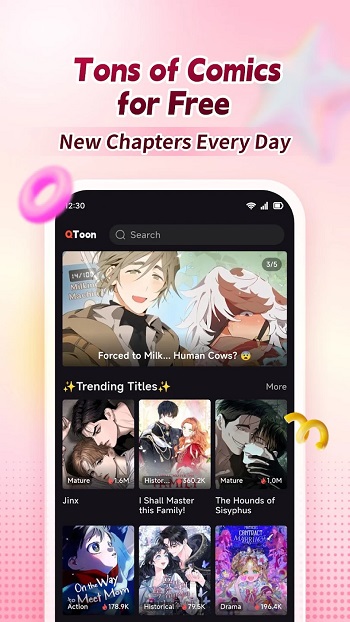
Finding a suitable story is an important part of using any comic reader. QToon provides a search function that allows users to look for titles directly instead of manually scrolling through the entire collection.
The application also supports browsing through categories and tags. These discovery tools help narrow the selection when you know the kind of story you want but do not have a specific title in mind.
For instance, a reader interested in fantasy can focus on related categories, while someone searching for a particular manga can enter its name into the search field. This creates two practical ways to find content: searching for something familiar or browsing to find a new series.
The home screen highlights recent additions and trending titles. These sections give readers a starting point when they want to see what is available without performing a specific search. Newly added chapters and stories can also provide reasons to revisit the catalog regularly.
Advertisement
However, the availability of individual titles depends on the application's current collection. A searchable catalog does not guarantee that every manga or manhwa series will be available.
Online Reading and Personal Library Management
QToon allows readers to open available chapters directly through its built-in reading interface. Images load within the application, removing the need to download and organize separate chapter files before reading.
This approach is particularly convenient for readers who prefer moving quickly between stories. You can open one series, read a chapter, and return to the catalog to find something else without managing external reading applications.
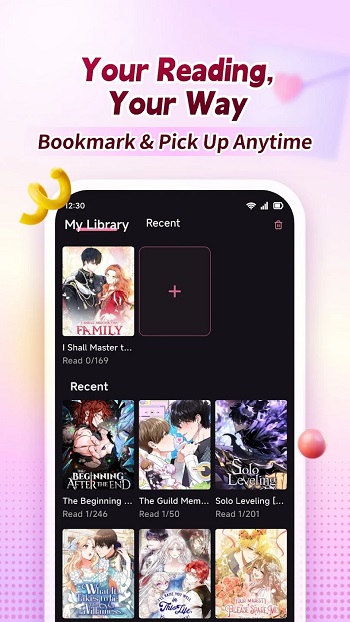
The personal library feature adds another layer of convenience. By creating an account, users can organize favorite titles and access them more easily during future reading sessions.
QToon also allows visitors to begin reading without registering. Account creation is therefore an optional step for readers who want additional organization rather than a requirement for accessing the basic reading experience.
How to Use QToon on Android
The reading process follows a simple sequence: open the application, find a comic, select a chapter, and read its illustrated pages. Most of the interaction involves navigating the catalog and choosing the content you want to follow.
Finding Your First Comic
After opening QToon, the home screen provides an overview of available content. Readers can begin with recently added stories or browse titles that are currently attracting attention.
If you already know which manga or manhwa you want, the search box offers a more direct route. Enter the title and review the available results. If you are undecided, category and tag browsing can help identify stories that fit your interests.
A practical approach is to begin with a familiar genre rather than choosing randomly from the full catalog. For example, readers who enjoy fantasy adventures can browse that category first, then compare several titles before selecting one.
Once a story catches your attention, open its available chapters to begin reading. This workflow keeps discovery and reading within the same application.
Reading Chapters and Following Multiple Stories
QToon presents comic artwork directly on the Android screen. This eliminates the extra steps associated with opening image archives or manually arranging downloaded pages.
Image loading speed matters because comics often contain numerous illustrated panels. Smooth loading helps preserve the flow of a story, particularly during scenes where the artwork carries much of the action or emotion.
The application is suited to short reading sessions as well as longer periods spent following a series. You can read a chapter during a break or continue through several available chapters when you have more time.
Readers who follow multiple ongoing stories may find it helpful to use the personal library. Keeping favorite titles together reduces the need to search for the same series whenever they return to the application.
Creating an Account and Organizing Favorites
Registration is optional for basic reading. Users who prefer immediate access can begin browsing comics without first creating a personal profile.
For readers who want to maintain a collection of favorite titles, QToon provides account registration through Google login or an email address. This makes the personal library available as an organizational tool.
A personal collection becomes particularly useful when several series are being followed simultaneously. Instead of remembering every title or repeatedly entering search terms, readers can use their saved library as a convenient starting point.
Advertisement
For occasional visitors, the ability to read without an account keeps the initial process simple. More frequent readers can decide whether maintaining a library would make their routine easier.
QToon APK for Android: Online and Offline Reading
QToon is centered on reading comics through an internet connection. Understanding how this works helps readers decide whether the application fits their usual reading habits.
Reading Comics Without Downloading Chapter Files
One of QToon's defining characteristics is that chapters can be viewed online. The application loads comic images when readers open the available content, so there is no need to save every chapter as a separate file.
This can simplify storage management for people who read many different series. A large personal collection of downloaded comic chapters can take up considerable space, especially when the artwork contains detailed, high-resolution images.
With online reading, the application handles the viewing process while the content is accessed. Readers can focus on selecting stories rather than maintaining a collection of image folders.
The convenience comes with a limitation: reading depends on connectivity and the availability of the selected content. A stable connection is especially helpful when opening chapters containing many illustrations.
Can You Read QToon Comics Offline?
QToon does not provide a dedicated feature for downloading complete manga or manhwa chapters for offline reading. Its primary reading experience requires an internet connection to load content.
This distinction matters for people who frequently read while traveling, commuting through areas with poor reception, or spending time without mobile data or Wi-Fi.
Readers who normally have reliable internet access may find online viewing convenient because it avoids managing downloaded chapter files. Those who specifically need an offline comic library should consider this limitation before relying on QToon for travel reading.
Similarly, the personal library should be understood as a way to organize favorite titles, not as a collection of comics stored locally for offline use.
Advantages, Limitations, and Who Should Use QToon
QToon is most suitable for Android users who want a straightforward way to browse manga, manhwa, and comics without maintaining a separate collection of downloaded files.
Its combination of genre browsing, title search, trending recommendations, and optional account features makes it particularly relevant to readers who enjoy finding new series alongside familiar favorites.
Advantages of QToon include:
- A collection of manga, manhwa, and comics spanning multiple storytelling genres.
- Online chapter reading without downloading individual comic files.
- Search functionality for locating specific titles.
- Category and tag browsing for finding stories based on personal interests.
- Home-screen sections featuring trending content and recent additions.
- Basic reading access without mandatory account registration.
- An optional personal library for organizing favorite series.
Limitations to consider:
- Offline chapter downloads are not supported.
- An internet connection is needed for the main reading experience.
- Specific manga and manhwa titles depend on the current catalog.
- Image loading can be affected by connection quality.
For casual readers, the ability to open a comic without creating an account is a useful convenience. For dedicated manga and manhwa fans, the search tools and personal library offer a more organized way to keep track of multiple interests.
QToon APK is especially relevant to readers who value quick content discovery and online access. Its strongest appeal lies in bringing different comic genres into a single Android reading environment, while its main limitation remains the absence of downloadable chapters for offline use.
FAQs QToon
What is QToon?
+
QToon is a mobile comic reading app that lets users read manga, manhwa, and webtoons from Japan, Korea, and China in one platform.
Is QToon free to use?
+
Yes, QToon offers hundreds of free titles, but users can also pay for premium series with exclusive content.
Does QToon require an internet connection?
+
Most features need an internet connection for updates, but some downloaded comics can be read offline.
Who developed QToon?
+
QToon was developed by MD Apps Gateway, a team known for building user-friendly reading and entertainment apps.
What makes QToon different from other comic apps?
+
It combines HD visuals, global content, daily updates, and a clean interface that makes reading comfortable and engaging.
Discover More Interesting Apps
-

MangaMuse
v1.7.23
53.68 Mb
Updated -
Mod
Tappytoon
v4.24.0
65.26 Mb
Updated -
Mod
Toomics - Read Premium Comics
v1.7.0
24.55 Mb
Updated -
Mod
WEBTOON
v26.111.0
112.74 Mb
Updated -
Mangadex
v1.0.0
21688527
Updated -
Mod
Marvel Unlimited
v7.102.0
44.56 Mb
Updated -
TMO Manga
v2027.02.30
29.75 Mb
Updated -
MangaOwl
v1.0.4
119580860
Updated -
AnimeHeaven
v2.0.0
19 MB
Updated -
Animesuge
v2.0
2 MB
Updated










Share Your Thoughts